



In-app surveys typically see response rates of 10-30%, compared to email surveys that struggle to reach 2-3%. When users are already engaged in your product, they’re significantly more likely to share their thoughts.
Feedback Best PracticesProduct ManagementUser Feedback Management
Why In-App Surveys Are Your Secret Weapon for Better User Feedback
As a product manager, you’re constantly balancing user needs with business goals, feature requests with technical constraints, and data-driven decisions with intuitive product sense.
But here’s the challenge…
How do you consistently capture high-quality user feedback without disrupting the user experience or relying on outdated methods like email surveys that users ignore?
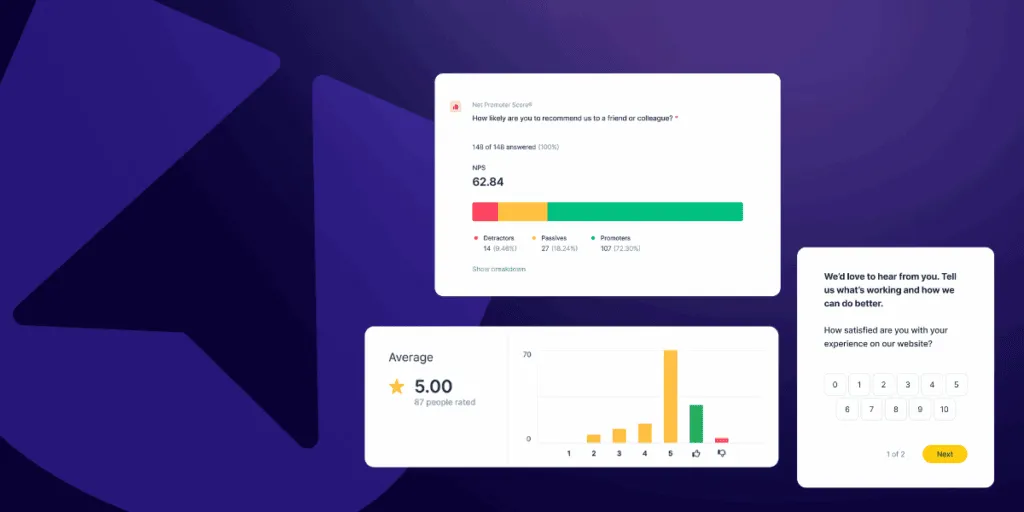
Enter in-app surveys. When done properly, in-app surveys are the most effective way to collect targeted, contextual feedback directly from users when they’re actively engaged with your product. Unlike traditional feedback methods, in-app surveys capture users in the moment, leading to higher response rates, more accurate insights, and actionable feedback that actually drives product decisions.
The In-App Survey Advantage: Why Context Matters More Than Convenience
Traditional feedback collection methods like email surveys, exit interviews, or generic contact forms suffer from a fundamental flaw. They remove users from the context where they experienced the problem or formed the opinion you’re trying to understand.
In-app surveys solve this by capturing feedback at the point of experience.
When a user completes a key workflow in your product, encounters a new feature, or reaches a milestone, that’s the perfect moment to ask for their input. The context is fresh, their experience is immediate, and their feedback is far more accurate and actionable.
Consider these compelling advantages of running an in-app survey:
1.Response Rates That Actually Matter
2.Contextual Accuracy
A user reporting friction in your onboarding flow while they’re actually going through that flow provides infinitely more valuable feedback than someone trying to remember their experience weeks later via email.
3.Real-Time Course Correction
Instead of discovering major user experience issues months after launch through quarterly surveys, in-app surveys let you identify and address problems immediately, reducing churn and improving satisfaction before issues compound.
4.Reduced Survey Fatigue
Because in-app surveys are triggered contextually and can be precisely targeted, users receive relevant surveys at appropriate moments rather than generic surveys that feel like interruptions. Keeping each survey to one or two questions, as in micro-surveys, reduces fatigue further.
Beyond Basic Surveys: How Userback Transforms Feedback Collection
While many tools offer basic in-app survey functionality, Userback takes a comprehensive approach that transforms how product teams collect, understand, and act on user feedback.
Here’s what makes the difference:
Advanced Targeting and Segmentation
Generic surveys sent to all users generate generic insights. Userback’s user segmentation lets you target surveys based on user behavior, demographics, subscription level, or any custom properties you track. Want to understand why enterprise customers aren’t using a specific feature? Create a segment for enterprise users who haven’t engaged with that feature in the last 30 days and survey them specifically.
This targeting capability means every survey response is relevant and actionable, rather than diluted by responses from users outside your target segment.
Template Library That Gets You Started Fast
Userback provides battle-tested survey templates for the most common product management use cases:
- Net Promoter Score (NPS): Measure user loyalty and likelihood to recommend your product
- Customer Satisfaction (CSAT): Gauge satisfaction with specific features or interactions
- Customer Effort Score (CES): Understand how easy or difficult users find specific tasks
- Product Feedback: Collect feature requests, bug reports, and general product insights
These templates aren’t just convenient—they’re optimized for response rates and designed to generate actionable insights based on proven product management methodologies.

Complete User Context That Brings Feedback to Life
Here’s where Userback’s approach to in-app surveys sets it apart from other in-app survey tools.
Every survey response is automatically enhanced with comprehensive user context.
When a user submits feedback through an in-app survey, Userback captures:
- Session replay showing their interactions leading up to the survey
- User data providing context about who submitted the feedback and their usage patterns
- Unified feedback history that groups the survey response with all other feedback from that user
Most importantly, Userback creates a complete picture by connecting survey responses with other feedback sources from the same user. This means you can see survey responses alongside their visual feedback submissions, feature requests, and bug reports to understand the full story behind their experience.
This unified approach transforms a simple “the checkout process is confusing” survey response into a comprehensive user insight that shows not just their opinion, but their complete feedback history and behavioral context.
See Userback In Action
Discover how Userback helps you collect, manage, and act on user feedback with ease.
Integration with Your Complete Feedback Ecosystem
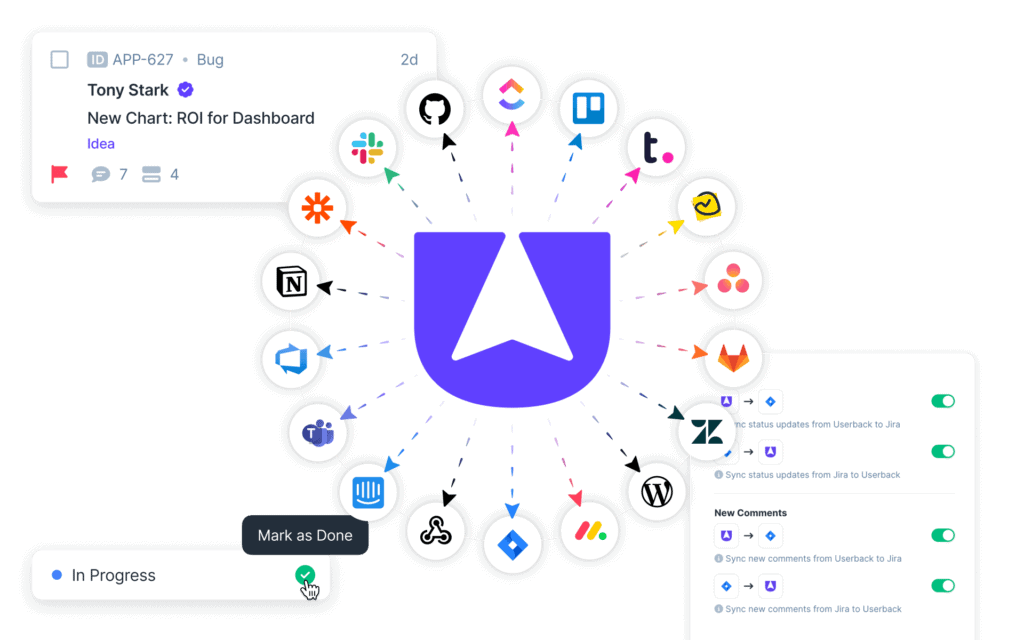
In-app surveys don’t exist in isolation. They’re part of your broader feedback collection strategy. Userback seamlessly connects survey responses with other feedback sources.
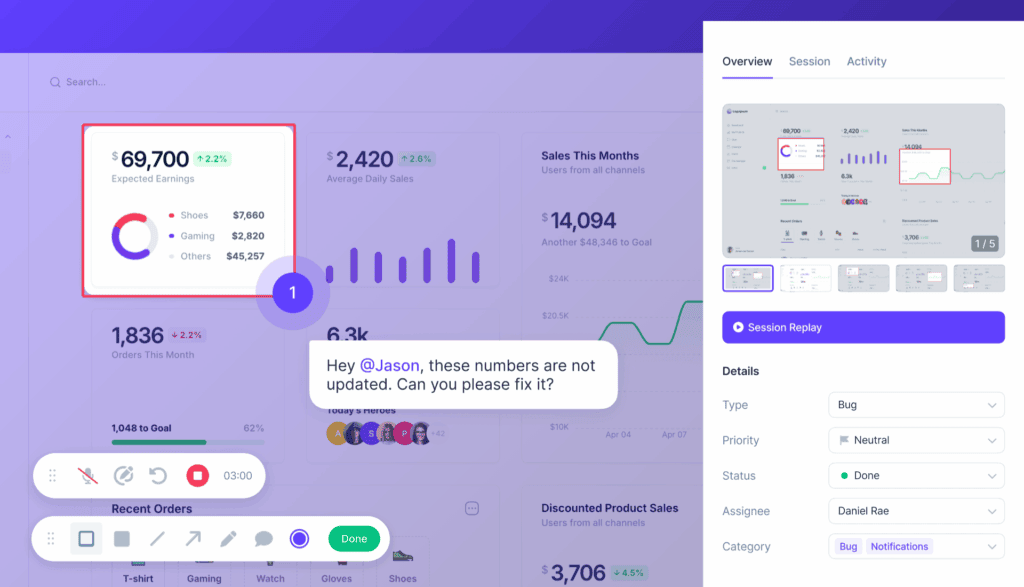
- Visual Feedback Widgets let users highlight specific UI elements and provide targeted feedback, which you can correlate with survey responses to identify patterns.
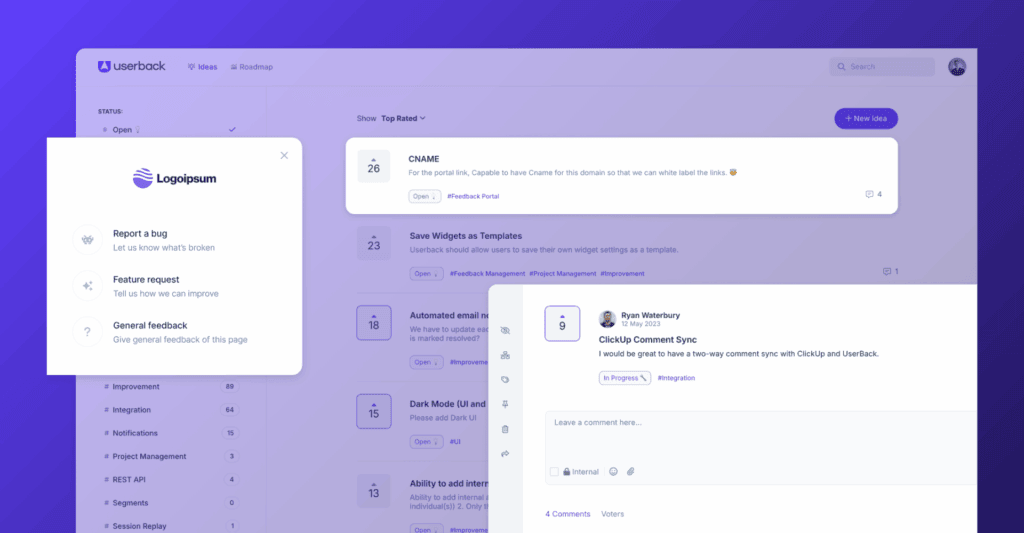
- Feature Portals show you which features users are requesting most through surveys, while letting your community vote and comment on those requests.
- Session Replays provide the full story behind survey responses, showing you not just what users said, but what they actually did.
This unified approach means you’re not managing feedback in silos. Instead, survey insights inform your visual feedback analysis, feature requests connect to user satisfaction scores, and session data validates survey responses.

Implementing In-App Surveys: A Strategic Approach
The key to successful in-app surveys isn’t just the tool… It’s the strategy. Here’s how to implement surveys that drive real product improvements:
1. Map Surveys to User Journey Moments
Identify the key moments in your user journey where feedback would be most valuable:
- Post-onboarding: After users complete your initial setup flow
- Feature adoption: When users first engage with new features
- Achievement points: After users complete important tasks or reach milestones
- Before churn indicators: When user engagement patterns suggest potential churn
Early on, one moment matters more than the rest: asking active users how they would feel if they could no longer use your product. A product-market fit survey turns that answer into a number you can track.
2. Start with High-Impact, Low-Frequency Surveys
Begin with quarterly NPS surveys and post-feature-launch satisfaction surveys. These provide foundational insights without overwhelming users. As you build confidence and response rates, add more targeted user surveys for specific user segments or workflows.
3. Close the Feedback Loop Visibly
When users provide survey feedback, show them how you’re using it. Update your feature portal with survey-informed roadmap changes, send follow-up surveys to users who reported issues to confirm resolution, and publicly acknowledge user suggestions that influence product decisions.
4. Use Survey Data to Inform Other Feedback Collection
Survey responses often reveal areas where you need deeper investigation. Use survey insights to guide where you place visual feedback widgets, which user segments to target for session replay analysis, and what questions to ask in user interviews. For the surveys themselves, start from our product survey questions.
Improve how you conduct in-app surveys with your users
Userback is an all-in-one feedback solution to collect more feedback and act on it faster.
Measuring Success: KPIs That Matter
Track these metrics to ensure your in-app survey strategy delivers results:
- Response Rate by Survey Type: Understand which surveys resonate most with your users
- Time to Survey Completion: Shorter completion times indicate well-designed, relevant surveys
- Feedback Actionability Score: Measure what percentage of survey feedback leads to product changes
- User Satisfaction Trends: Track satisfaction scores over time to measure product improvement impact and understand user sentiment patterns
- Feature Adoption Post-Survey: Measure whether users who provide feedback show increased engagement
Transform Feedback Collection Into Product Intelligence
In-app surveys aren’t just about collecting more feedback. They’re about collecting better feedback that directly informs product decisions. When combined with Userback’s visual feedback, session replays, and feature management capabilities, surveys become part of a comprehensive system for understanding and improving user experience.
The most successful product managers don’t just listen to users. They create systematic ways to capture, analyze, and act on user insights at scale. In-app surveys, done right, provide the foundation for data-driven product management that consistently delivers user value.
Ready to see how in-app surveys can transform your feedback collection?
Start free with Userback today!